Xfusion
Chrome extension for Amazon sellers

See what's really selling on Amazon, right on the page you're viewing

Xfusion adds seller-grade data on top of amazon.com: bought-in-past-month badges, FBA vs FBM sellers, variant prices, keyword ideas and Top N benchmarks. No separate dashboard.

The extension installs on desktop Chrome, Edge, Brave or Cốc Cốc. Tap the button to send the link to your computer.

Or open the Chrome Web Store page
  • Free to install
  • Installs in seconds
  • No card needed
  • Reads only the public data on the page you're viewing
amazon.com › Product pageXfusion
Xfusion Amazon panel on a product page: rating, review count, listing quality, variants and feasibility check
Rating, reviews, stock
Image ZIP and listing quality
Feasibility check
Sold signalsFBA or FBMVariant pricesTop N benchmark
  • On the Chrome Web Store
  • Free to install, no card needed
  • Works right on amazon.com
  • 22 research features
Why Amazon sellers need real data

Stop picking products and keywords by gut feel

Three situations Amazon sellers run into all the time.

Guessing which products actually sell

Before

Search results show thousands of listings and you can't tell which ones move volume.

With Xfusion

Xfusion reads the bought-in-past-month labels and shows Sponsored, Best Seller and Amazon's Choice badges in one sortable table.

Not knowing who you compete with

Before

Is the seller Amazon itself, an FBA seller or a merchant shipping their own orders? You find out one page at a time.

With Xfusion

Seller type is classified for you: Sold by Amazon, 3P FBA, 3P FBM or Brand.

Writing listings without keyword data

Before

Titles and bullets are guesswork unless you check what shoppers type and what top listings repeat.

With Xfusion

Keyword Mining pulls live suggestions from Amazon autocomplete, and high-frequency words show what top titles repeat.

See it in action

One panel, enough data to decide

Real screenshots from the extension running on Amazon. Tap the tabs.

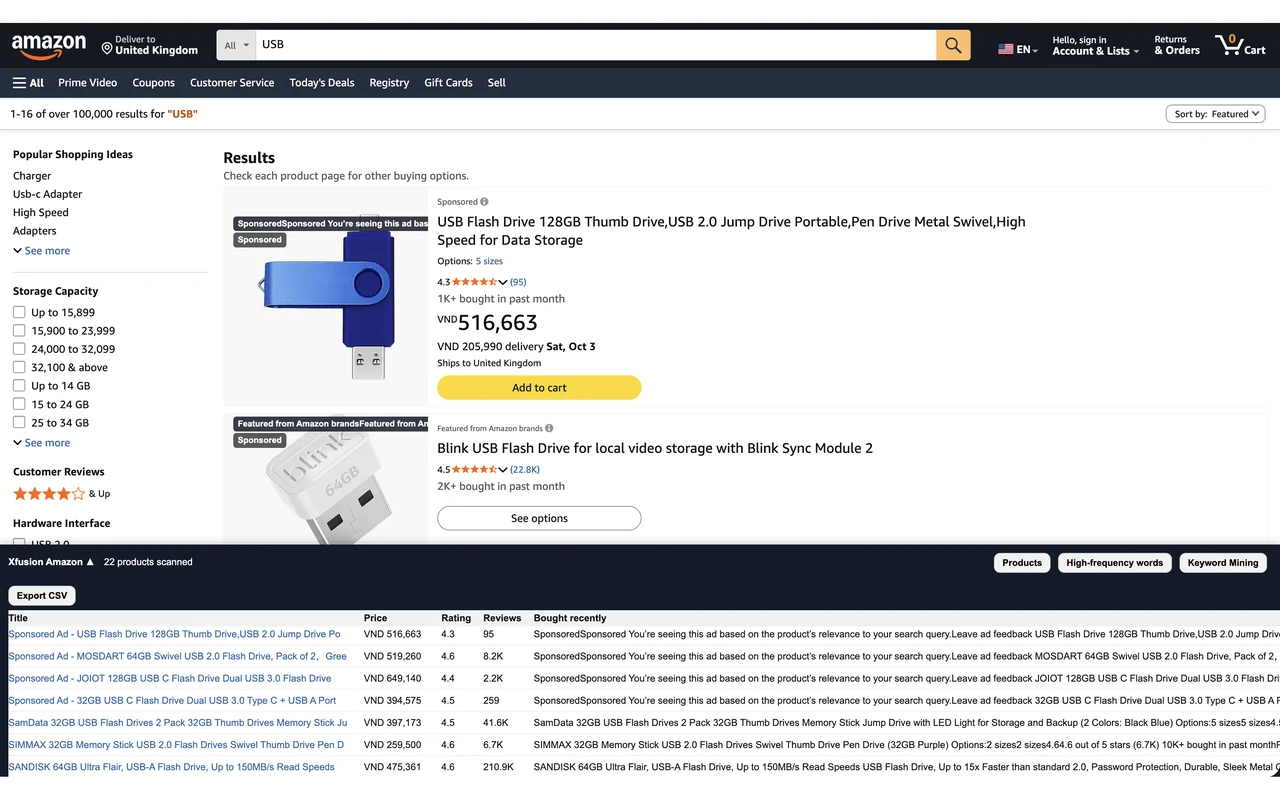
A whole results page in one table

The bottom bar lists every product it scanned so you can compare instead of opening listings one by one.

  • Price, rating, reviews and bought-recently signals
  • Sponsored and badge labels at a glance
  • Sort and export to CSV
amazon.com › Product pageXfusion
Xfusion Amazon products table on a search results page

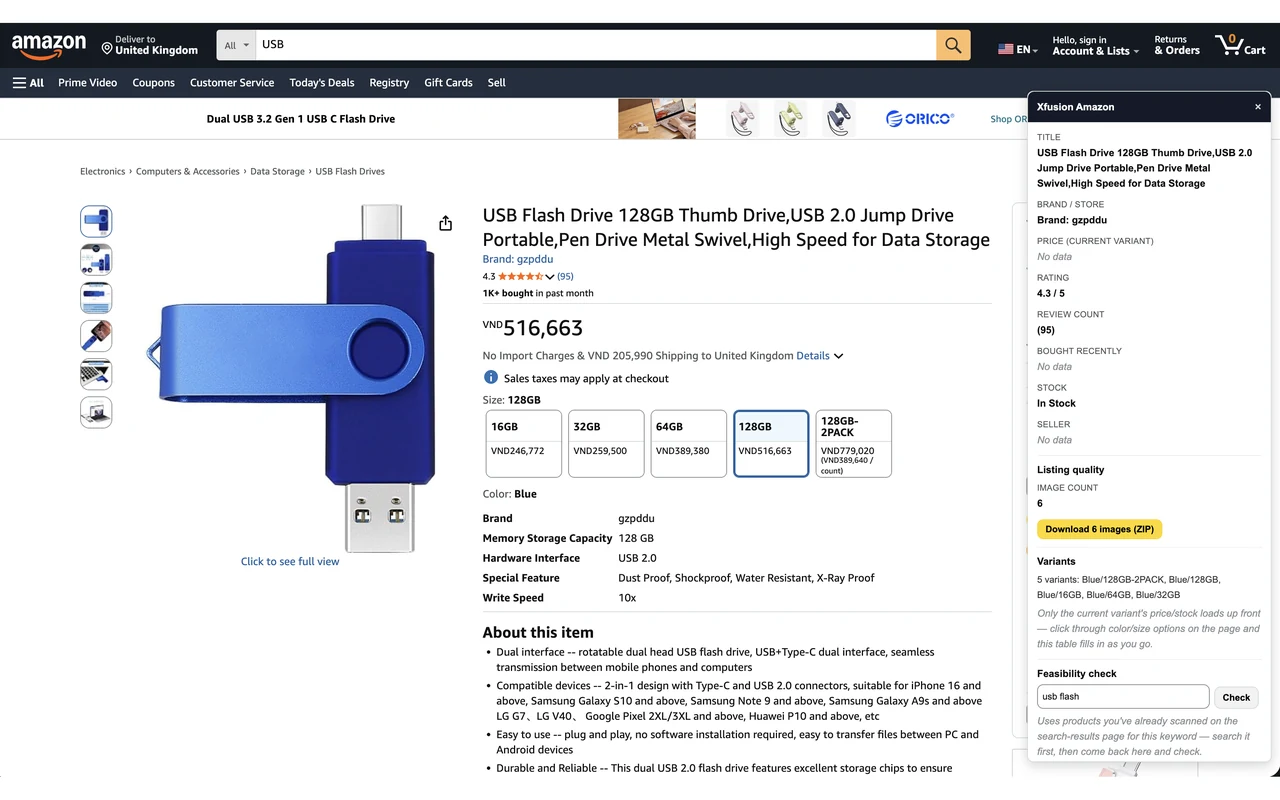
A detail panel right on the listing

Open a product and the side panel shows price, rating, reviews, stock, seller info, image count and a variants table.

  • Seller type: Amazon, FBA, FBM or brand
  • Image count and one-click ZIP download
  • Variant list and feasibility check
amazon.com › Product pageXfusion
Xfusion Amazon detail panel next to a product page

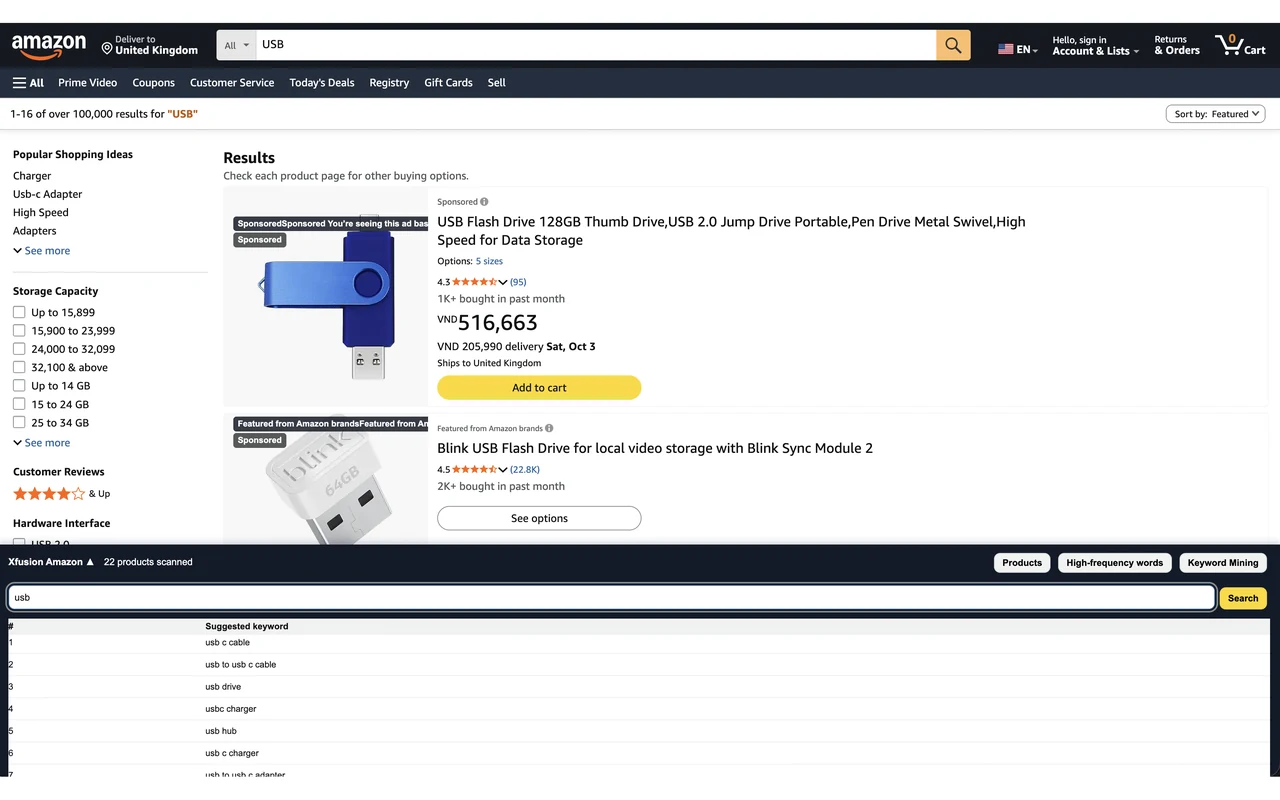
Keyword ideas straight from Amazon

Keyword Mining queries Amazon's own autocomplete in real time so you see what shoppers actually start typing.

  • Live suggestions for any seed keyword
  • Works from the results page you are on
amazon.com › Product pageXfusion
Xfusion Amazon Keyword Mining table showing suggested keywords

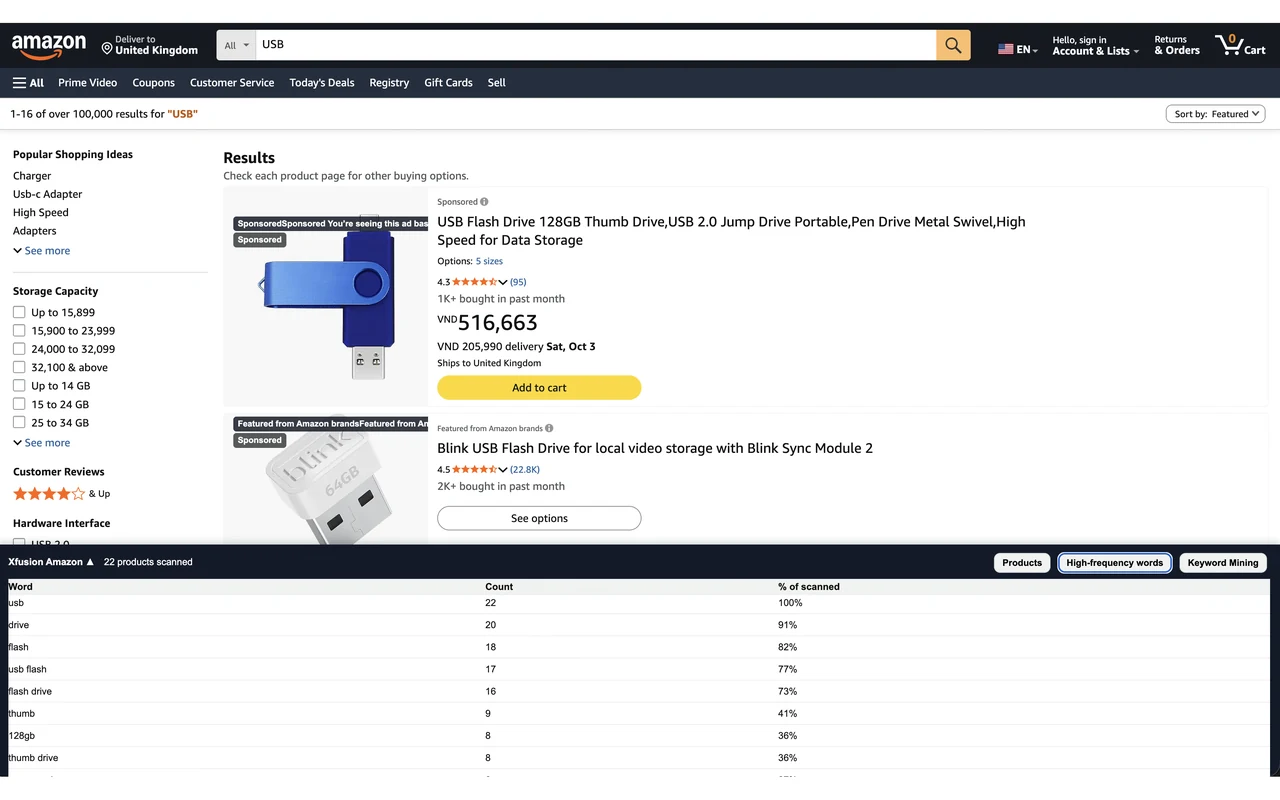
Which words do top titles repeat?

Xfusion counts and ranks the words used most across the titles it scanned, with English stopwords removed.

  • Ranked by frequency
  • Useful when writing titles and bullets
amazon.com › Product pageXfusion
Xfusion Amazon high-frequency keywords table
Add to Chrome — FreeSend the install link to my computer

The extension installs on desktop Chrome, Edge, Brave or Cốc Cốc. Tap the button to send the link to your computer.

Key benefits

Everything to size up a niche, right on Amazon

No separate dashboard, no copy-pasting.

Sold signals at a glance

Bought-in-past-month labels plus Sponsored, Best Seller, Amazon's Choice and coupon badges on every result.

A table for the whole results page

Sort by price, rating, reviews or bought, then export to CSV.

Seller type: FBA or FBM

Sold by Amazon, 3P FBA, 3P FBM or Brand, shown right in the panel.

Variant prices and stock

The table fills in as you click through size and color options.

Keyword ideas from Amazon

Live autocomplete suggestions and the words top titles repeat.

Top 3/5/10 benchmark

Median price, coupon coverage and volume share from the results you scanned, plus a benchmark tab on the product page.

Every feature, in one extension

Search results pagesRead a whole results page at a glance
  • Sold badges and "bought in past month"Reads the "bought in past month" label (100+, 2K+...) and highlights Sponsored, Best Seller, Amazon's Choice and coupon badges on every result.
  • Products table (bottom bar)A bottom-bar table of everything scanned: sort by price, rating, reviews or bought, and export to CSV.
  • Keyword MiningPulls live keyword suggestions straight from Amazon's own autocomplete.
  • High-frequency keywordsCounts and ranks the words used most across top titles, with English stopwords removed, to sharpen your listing SEO.
  • Winning Product Analysis: Top 3/5/10 benchmarkTier A patterns from search results (median price, coupon coverage, volume share, rating floor) plus Tier B deep scans from product pages you open, with a "Why these N?" explainer.
Product detail pagesAn analysis panel right on the listing
  • Detail panelA side panel with ASIN, price, rating, review count, seller type and analysis tabs.
  • Seller classificationTells you at a glance: Sold by Amazon, 3P FBA (Fulfilled by Amazon), 3P FBM (Merchant) or Brand.
  • Listing SEO auditCounts hi-res images, checks for video, title length (characters and words), bullet points and category BSR.
  • Variant price and stock tableAmazon doesn't load every variant upfront, so Xfusion fills the price and stock table as you click through size and color options.
  • Feasibility checkA lower-bound revenue estimate for a niche from the competitors you scanned (bought x price), plus competitor count. A reference point, not a forecast.
  • Benchmark tab on the product pageCompares the listing you're viewing with the niche median (price, rating, reviews, images, BSR) and shows the delta.
  • Unusual-activity hintsFlags signs of unusual review or return activity for you to weigh. Informational only.
  • Ads readiness checkReview a listing's raw signals before you spend on Sponsored Products.
Downloads and sharingImages and quick reports
  • Download all images (ZIP)Bundle every hi-res product image into one ZIP.
  • Share insight imageSnapshot the panel as a clean PNG with a Xfusion banner, ready to send to a teammate or client.
Account and platformSign-in, Free and Pro, trial
  • One Google sign-inOne Google account works across the whole Xfusion family.
  • Free and ProFree shows the first 10 rows of the tables and 3 rows of the variant table. Pro unlocks everything, including CSV export.
  • 1-day Pro trialNew accounts get 1 day of Pro the first time they sign in.
  • Refer a friend: +5 days of Pro eachWhen a friend enters your referral code, you both get 5 extra days of Pro. No cap on referrals.
  • Optional cloud syncAfter you sign in you can turn on sync to send a copy of the public data you viewed to Xfusion and review it outside the browser. Off by default; turn it off any time.
  • Pay by international cardUpgrade to Pro inside the extension and pay by international card (Visa, Mastercard, Apple Pay, Amex) through Polar.
  • Multi-language interfaceInterface in English, French and German.
Add to Chrome — FreeSend the install link to my computer

The extension installs on desktop Chrome, Edge, Brave or Cốc Cốc. Tap the button to send the link to your computer.

Up and running in seconds

Three steps to get started

1

Install from the Chrome Web Store

Click Add to Chrome. It takes seconds and needs no card.

2

Open amazon.com

Search for a keyword or open any product as usual.

3

See the Xfusion panel

Sold signals, seller type, variants, keywords and benchmarks appear on the page.

Add to Chrome — FreeSend the install link to my computer

The extension installs on desktop Chrome, Edge, Brave or Cốc Cốc. Tap the button to send the link to your computer.

Free and Pro

Start free, upgrade when you need more

Install and use the Free plan right away. Sign in with Google for the first time and get 1 day of Pro to try everything.

Free

Works the moment you install

  • Sold and "bought in past month" badges on every result
  • Seller info on the product page
  • First 10 rows of the tables and keyword lists
  • First 3 rows of the variant price table
  • Winning Product Analysis: 1 of 2 insights
Most complete

Pro

Everything unlocked

  • Unlimited rows in every table, keyword list and variant table
  • CSV export of everything scanned
  • Full Winning Product Analysis up to Top 10
  • Full feasibility check and Benchmark tab
  • 1-day trial the first time you sign in
Refer a friend: you both get 5 extra days of Pro. No limit on how many friends you invite.
Add to Chrome — FreeSend the install link to my computer

The extension installs on desktop Chrome, Edge, Brave or Cốc Cốc. Tap the button to send the link to your computer.

FAQ

What sellers ask before installing

Is Xfusion safe to use? Will it affect my Amazon account?

Xfusion only reads and re-displays public data already on the page you're viewing, inside your own browser. It doesn't access your Amazon seller account and doesn't act on your behalf.

Do I need to sign in?

The Free plan works right after install. Signing in with Google is optional, and your first sign-in gives you 1 day of Pro to try everything.

Where is my data stored?

Scanned product and keyword data is stored in your own browser. Xfusion doesn't collect personal information beyond your Google sign-in email (if you sign in) and doesn't sell data to third parties. Cloud sync is optional and off by default. See the privacy policy in the footer.

Which browsers work? Can I use it on my phone?

Xfusion installs on desktop Chrome and Chromium-based browsers such as Edge and Brave. Phone browsers can't install extensions, so if you're on your phone, send this link to your computer.

Which Amazon site does it work on?

XFusion Amazon & eBay Intelligence works on amazon.com.

How does Pro work and how do I pay?

Free shows the first 10 rows of the tables. Pro unlocks unlimited rows, CSV export and benchmarks up to Top 10. Pro is a paid plan; you see the plans and pay inside the extension by international card.

How accurate are the revenue numbers?

Revenue figures are lower-bound estimates based on the competitors you scanned (bought-in-past-month x price). Use them as a reference, not a forecast or a market-wide number.
Ready to see what's really selling on Amazon?

Install Xfusion in seconds, open Amazon and watch the panel appear. Free to start.

Add to Chrome — FreeSend the install link to my computer

The extension installs on desktop Chrome, Edge, Brave or Cốc Cốc. Tap the button to send the link to your computer.

Or open the Chrome Web Store page
Add to Chrome — FreeSend the install link to my computer